Eliott65 for complete beginners
Never touched a microcontroller? It doesn’t matter. In ten minutes, with one photo and a few diagrams, here is what Eliott65 is and why it is a little unusual.
On this page
1. The machine: an 8-bit computer of today
The Neo6502kbd is a small computer sold by Olimex, with its keyboard built into the case. At its heart is a real 6502, the processor of the Apple II, Commodore 64, Oric and BBC Micro: a new chip, made today by WDC under the name W65C02S.
Here is the board, out of its case, on our bench:
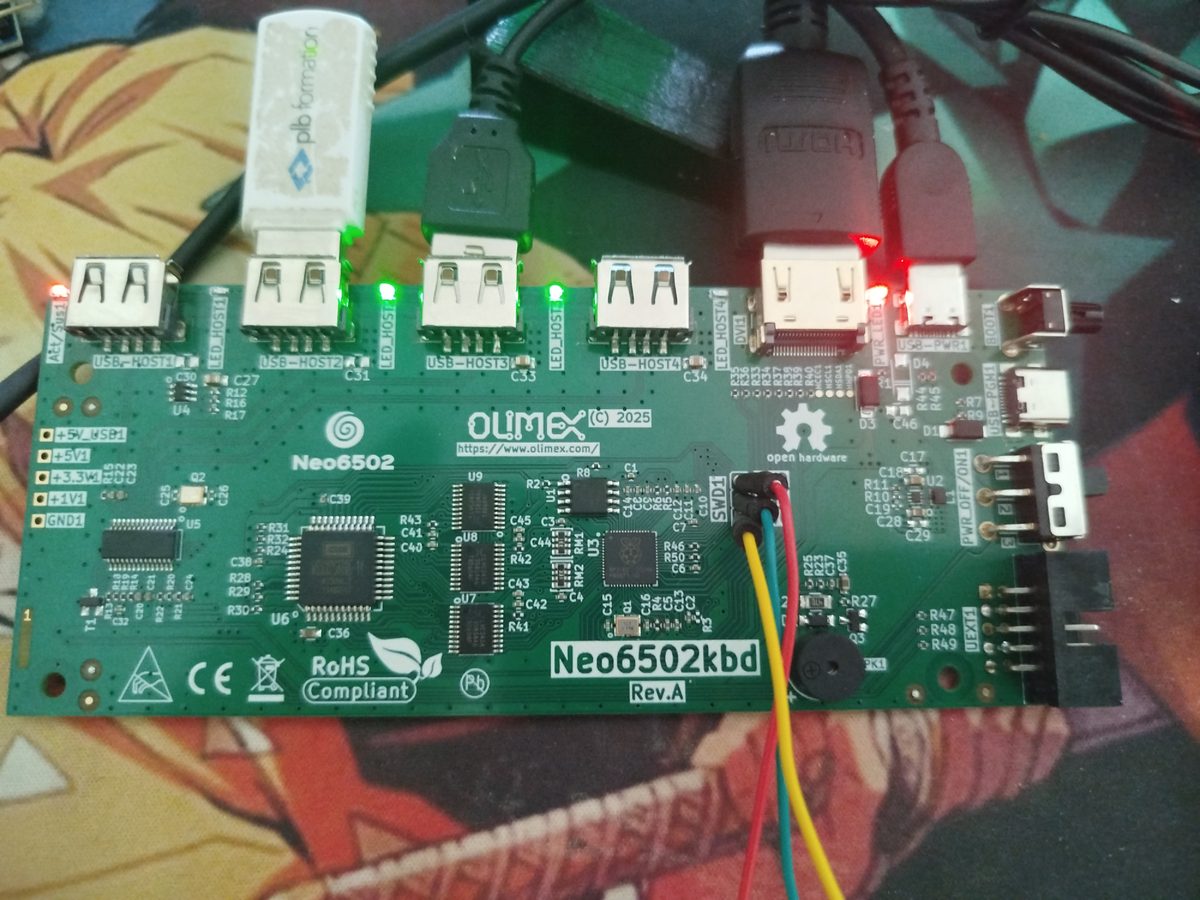
- W65C02S (U6) — the real 6502 processor. It runs the programs but has no memory of its own.
- 3 × 74LVC245 (U7 to U9) — three switches: they take turns carrying the low address, the high address and the data over the same 8 wires.
- RP2040 (U3) — the dual-core ARM microcontroller. It plays the 6502’s memory and runs all of Eliott65: kernel, video, USB, files.
- P25Q16 flash (U1) — 2 MB where the Eliott65 firmware sleeps while the board is off.
- FE1.1s USB hub (U5) — spreads the RP2040’s single USB port over the four sockets.
- USB-A sockets — keyboard, USB stick, mouse. The case keyboard is an ordinary USB keyboard.
- HDMI output — the picture, produced bit by bit by the RP2040, with no video chip.
- USB-C: power and PGM — power, and the PGM socket for talking to the PC (it then holds the hub in reset).
- SWD1 header — the debug port: three wires to a probe that reads and writes the RP2040’s memory while it runs.
- Speaker (SPK1) — a magnetic transducer: Eliott65 plays notes and melodies on it (SON service).
- UEXT header — I2C, SPI and serial expansions (not used by Eliott65).
Photo of our bench: the board powered on, USB stick plugged in, debug probe on SWD1.
What is surprising when you look closely: there is no memory chip next to the 6502. No ROM, no RAM. The 6502 is connected only to three small switching chips (marker 2), and behind them, to an RP2040 (marker 3), the microcontroller of the Raspberry Pi Pico.
2. The board’s trick: an RP2040 that plays the memory
A processor spends its time saying “give me the byte at this address” or “store this byte at this address”. On a conventional computer, a memory chip answers. Here, it is the RP2040: it listens to every request from the 6502 and answers itself, several million times per second. The 64 KiB that the 6502 believes it has are in fact a piece of the RP2040’s memory.
3. The idea behind Eliott65: leave all the memory to the 6502
On a 1980s microcomputer, the system takes up a good part of the memory: BASIC ROM, screen area, system variables. What is left for your programs is often much less than the 64 KiB the 6502 can address.
Since the RP2040 is right there, alongside, with its two cores and 264 KiB of memory, Eliott65 puts the whole system there: the kernel, the drivers, file management. In the 6502’s memory, it keeps only 8 bytes.
These 8 bytes are:
- 2 “gate” bytes (at
$FFF8and$FFF9): this is how programs ask the system for a service; - 6 vector bytes (from
$FFFAto$FFFF): the 6502 requires them; they tell it where to start and where to go when an interrupt occurs.
4. Asking for a service: the call gate
When a program wants to display text, read a file or find out the time, it makes a system call. With Eliott65, it works like a counter window: you fill in a form, slide it through the slot, and wait for the answer.
The form (the parameter block) is stored wherever the program wants, in its own memory. Nothing is reserved in advance for it. That is what makes it possible to keep only 8 bytes.
5. What you see on the screen
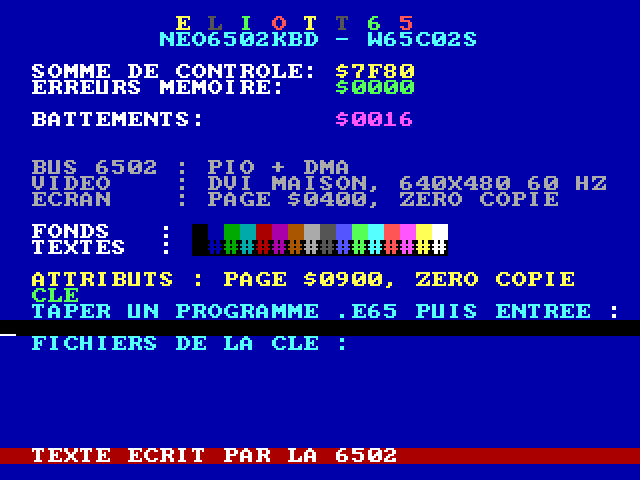
At start-up, Eliott65 runs a small test program that checks the memory and displays the state of the system, then it looks for a shell on the USB stick: a command line where you type the name of a program to launch it.
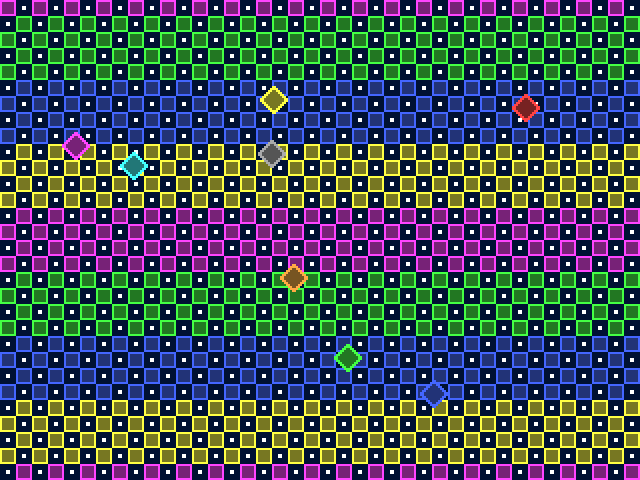
Eliott65 can also do graphics: scrolling tile backgrounds and sprites (those little characters that move over the background).
6. Several programs at once
Eliott65 can run up to 8 programs at the same time. Only one has the screen and the keyboard (you switch with Ctrl+Tab); the others carry on in the background.
But the 6502 has only one 64 KiB memory. The trick: when switching from one program to another, the RP2040 puts away the useful pages of the first in its own reserve and puts back those of the second in their place. Since most programs use only a small part of their 64 KiB, it fits.
And what if a program never hands back control? The kernel interrupts it anyway, thanks to a hardware interrupt of the 6502 (the NMI): this is pre-emptive multitasking.
7. Switching off without losing anything: hibernation
Since all of the 6502’s memory is in the RP2040, the system can save it to a file on the stick, along with the state of the screen and keyboard. Later, you “launch” this file like a program, and the machine resumes exactly where it left off, down to the byte.
8. In short
| Question | Short answer |
|---|---|
| What is it? | A firmware, a kernel and a small operating system for the Neo6502kbd. |
| What is different? | The system lives in the RP2040; the 6502 keeps 65,528 bytes out of 65,536. |
| Does it really work? | Yes: everything described here has been measured and validated on the board. |
| What does it replace? | The board’s original firmware. The two are not compatible: programs must be written for Eliott65. |
| What next? | See Where the project stands. |
To go further, each idea on this page has its own article: the bus, system calls, video, multitasking, hibernation. And the technical terms are explained in the glossary.